Master Git Commands: A Beginner's Guide 🚀
If you want to become a professional developer, learning **Git** is mandatory. It is the tool that saves your code history and helps teams work together. In this guide, we will look at the most important Git commands you need for daily work. No complex theory, just practical commands!
1. How to Start a Project? (The Start)
If a project already exists on the internet (GitHub), you need to download it to your computer.
git clone [url]
This command downloads the entire project code from the cloud to your local machine.
git clone https://github.com/username/projectname.git2. How to Save Your Code? (The Save Cycle)
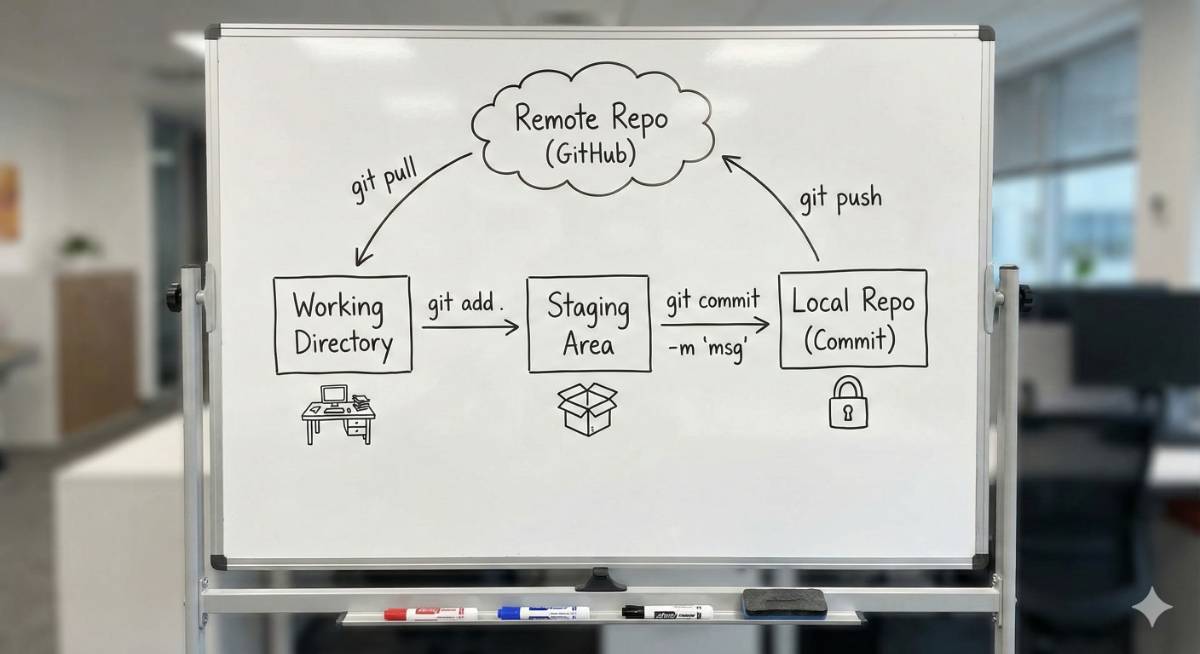
Saving in Git is a two-step process. First, you choose the files, and then you "Commit" (Save) them.
Step A: Staging (Select Files)
Tell Git which files you want to prepare for saving.
1. To select a specific file:git add index.phpgit add .Step B: Commit (Final Save)
This permanently saves your changes with a message.
git commit -m "Designed the login page"3. Syncing with the Cloud
How to send your code to GitHub or get updates from your team.
| Command | Description |
|---|---|
git push origin main |
Upload: Sends your saved code (commits) from your computer to the GitHub server. |
git pull origin main |
Download/Update: If your team member updated the code, use this command to download their changes to your computer. |
4. Branching (Parallel Universes) 🌿
A "Branch" is like a parallel copy of your code. You create a branch to work on new features so you don't break the main website.
Useful Branch Commands:
1. To see all branches:
git branch2. To create a new branch:
git branch login-page-design3. To switch to another branch:
git checkout login-page-design4. To go back to the main code:
git checkout main⚡ Quick Cheat Sheet
- Clone:
git clone [url](Download project) - Stage All:
git add .(Prepare files) - Commit:
git commit -m "msg"(Save files) - Push:
git push(Upload to Cloud) - Pull:
git pull(Get updates) - Switch Branch:
git checkout [name]
Want to implement modern DevOps in your company? Orean Softwares helps businesses streamline their coding workflow.
Contact Us